
Key takeaways
- A draft or potential-return preview is not evidence of an accepted contract.
- Use the accepted receipt to verify price, stake, market and reference number.
- After a timeout, check history before resubmitting to avoid duplicate exposure.
- Settlement, available balance and withdrawal processing are separate records.
01
A status describes a stage, not a prediction
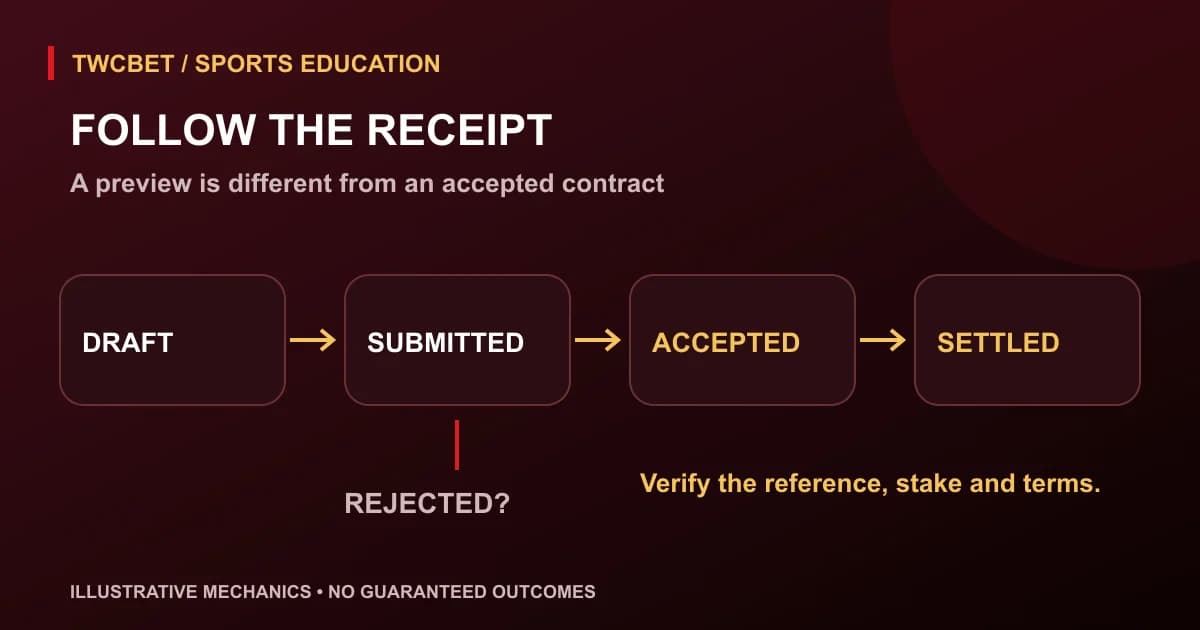
A bet slip passes through several stages: a draft is prepared, a request is submitted, acceptance or rejection is recorded, and an accepted contract is eventually settled. Interfaces may use different labels for these stages. The important question is what evidence confirms that a selection has been accepted, rather than whether a button was tapped.
Pending can be particularly ambiguous. It might describe a request awaiting acceptance, or an already accepted selection awaiting a result. Read the surrounding receipt fields and the service's help text. The same short word should not be used to infer both contractual acceptance and sporting settlement without checking which process is actually pending.
The TWCBetPro homepage is the starting point for this informational site. This guide does not assert that it provides an active betting account or any particular status labels. It explains a generic receipt-reading process. The event-page guide covers fixture navigation; here the focus is the transaction record after a selection is drafted.
02
Drafts, previews and submitted requests
A draft contains the selections you are considering and often a potential return based on the current quote. Editing a stake or adding a market can change that preview. A saved draft is useful for checking arithmetic, but it is not proof that money has been committed or that the displayed price is reserved.
Submitting a request starts another process. A market may close, the price may change or the request may fail validation before acceptance. Some services offer an explicit setting for whether changed odds may be accepted. Understand any available setting before using it; do not assume a price-change prompt works the same way everywhere.
A spinning indicator only tells you that the interface is waiting for something. It does not establish whether the server received, rejected or accepted the request. If connectivity fails at that point, avoid immediate repeated taps. The next step is to inspect the authoritative account history or receipt rather than guessing from the frozen screen.
03
What to look for in an accepted receipt
An accepted record should let you identify the contract: exact event, participant or outcome, market, line, included period, accepted odds, stake, funding type and a reference. The reference connects that record to later settlement and support enquiries. A timestamp helps distinguish an earlier draft from the final accepted request.
Compare the accepted price with the price you intended to use. If a conventional cash stake of RM10 is accepted at 1.80, a full winning total return is RM18 under the simple decimal model. At 1.70 it is RM17. The decimal-odds explanation shows why the accepted price, rather than the earlier event card, belongs in the calculation.
Treat these as conceptual stages rather than guaranteed TWCBet interface labels. The service's help documentation should explain its own words. The useful habit is to connect a label with evidence and identify what remains unresolved before deciding on any further action.
| Stage or label | Useful evidence | What it does not prove |
|---|---|---|
| Draft / selection preview | Editable stake and current quoted market | That a contract exists |
| Submitted / processing | Request sent or waiting indicator | Final acceptance or reserved odds |
| Accepted / open | Recorded reference, stake and accepted terms | That the selection will win |
| Rejected / failed | Explicit unsuccessful request record | Whether an earlier separate request succeeded |
| Settled | Final result and returned amount | That a withdrawal has been processed |
04
Handle a timeout without creating a duplicate
Imagine you submit a RM10 selection, the connection drops and no confirmation appears. Two situations are possible: the request never reached acceptance, or it was accepted but the response did not reach your screen. Retrying immediately can create a second RM10 contract in the latter situation. A missing confirmation alone cannot distinguish them.
Open account history through the verified route and search for the event, approximate time and stake. Refresh cautiously and look for an accepted reference. If the first request exists, keep that record and avoid duplicating it. If history remains unclear, stop and ask verified support to identify the request rather than submitting replacements to test the interface.
Do not estimate acceptance by watching the balance alone. Balances can include other open selections, refunds, credits or delayed display updates. A receipt identifies a contract more precisely than a temporary balance movement. The aim is to prevent accidental extra exposure, not to find a way to force acceptance during a closing market.
05
Rejection and changed-price messages
A rejected request ordinarily means that particular request did not become an accepted contract, but confirm the service's record and any balance adjustment. It does not prove that every previous request for the same selection was rejected. Similar timestamps or repeated taps make the reference numbers especially useful when checking history.
A changed-price prompt requires a fresh reading of the terms. Review the market and potential return again rather than focusing only on the new number. A line change is more than a payment change: minus 0.5 and minus 1 are different conditions. If the interface changes both price and line, assess the full contract from the beginning.
Never repeatedly resubmit because the market appears about to close. A deadline or live-score alert can make an ordinary verification step feel urgent, but urgency does not resolve uncertainty. Leave the selection unconfirmed when you cannot establish its status or meaning. Missing an opportunity is preferable to losing control of the amount committed.
06
Read settlement as a separate calculation
An accepted selection can remain open while the event is underway or while a result is checked. Settlement assigns the financial outcome according to the accepted contract and applicable rules. That outcome may be a full win, loss, refund or partial settlement. A sports score shown in the interface is not itself the payment record.
Compare the returned amount with the accepted stake and result condition. For ordinary cash, RM20 returned on a RM20 refunded selection means zero net profit. RM38 returned on a RM20 winning selection means RM18 net profit. Confusing those figures can make a refund look like earnings or hide how much money was actually lost.
If a record is corrected, retain both the original and revised reference details where available. Ask which market definition or official result drove the change. Do not assume an early balance credit is irrevocable, or that an unexplained adjustment supplies evidence of a new sporting result. The service's documented correction rules matter.
07
Separate balances, credit and withdrawals
A settled return and a completed withdrawal are different events. A betting record explains a contract's payment; a cashier record explains a transfer request and its status. Promotional balances may also have restrictions that cash balances do not share. Read each record in its own context rather than expecting one label to explain the whole account.
This guide makes no promise about payment methods, processing speed or verification requirements. Those details must be checked in the current service's secure cashier and complete terms. Avoid sending identity documents, passwords or one-time codes to contacts who offer to speed up an unresolved status through an unofficial channel.
The account-security guide covers verified routes and protecting credentials. When requesting help, a contract reference, event name, time and brief description are usually more useful than a screenshot containing unrelated personal information. Redact sensitive details from anything shared outside the secure official process.
08
Keep a concise mobile record
For each accepted selection, keep the reference, date and time, exact label, included period, odds, stake and funding type. Add the settled return once known. A compact note is enough for personal tracking; you do not need a detailed performance dashboard or to store sensitive account credentials alongside the receipt.
Check the time zone when matching a record to a fixture. A midnight display can place an event on a different calendar date in different regions. Use the service's stated time basis and record Malaysian local time separately if helpful. Do not assume the timestamp has the same meaning as a scheduled kickoff shown on another page.
Record all committed stakes against your fixed session budget, including those awaiting settlement. A pending result is still exposure. The responsible-gambling page explains why possible future returns should not be treated as available spending money or a reason to extend an ended session.
09
Next steps when a record is unclear
Read the account help for the exact label, compare the accepted receipt with history and ask verified support a focused question: was this reference accepted, what terms were recorded and what settlement applies? Avoid requesting a guaranteed outcome or relying on social messages that claim access to a private result feed.
Use the guide library for market definitions when the uncertainty concerns the contract itself. A useful result of this process can be deciding to stop until the record is clear. Accurate transaction reading protects against accidental duplication; it does not eliminate gambling risk or make any future selection more likely to win.
Editorial standards
TWCBET guides explain categories and safer-play principles in plain language. Always confirm the rules, limits, eligibility, and terms shown by the service before taking part.